The short version
Before you start designing.
- Speed, feedback, accessibility and stability all shape brand perception.
- Visual polish can soften minor friction, but it cannot compensate for serious usability problems.
- Forms, error states and loading behaviour often reveal how thoughtful a company really is.
- Motion should guide attention or express character. If it does neither, it is decoration.
- A clear design system and CMS keep the brand consistent as the website grows.
Development turns identity into experience
Brand strategies often rely on words such as bold, friendly, precise and dependable. Development gives those words a practical meaning.
Nielsen Norman Group’s research on the aesthetic-usability effect shows that attractive interfaces are often perceived as easier to use. That goodwill has limits. Strong visuals may soften minor friction, but they do not hide problems that interrupt the task.
To a visitor, visual identity and functionality are not separate deliverables. They are one experience.
A brand intention is an operational requirement. If the website cannot express it repeatedly, it is still only an idea.
Performance changes how a brand feels
Performance is measured technically but experienced emotionally. A fast, stable website feels considered. A delayed response creates uncertainty because the visitor cannot tell whether the action worked.
Google’s Core Web Vitals measure three useful parts of that experience:
- Largest Contentful Paint: how quickly the main content appears. A good result is 2.5 seconds or less.
- Interaction to Next Paint: how quickly the page responds. A good result is 200 milliseconds or less.
- Cumulative Layout Shift: how visually stable the page is. A good result is 0.1 or less.
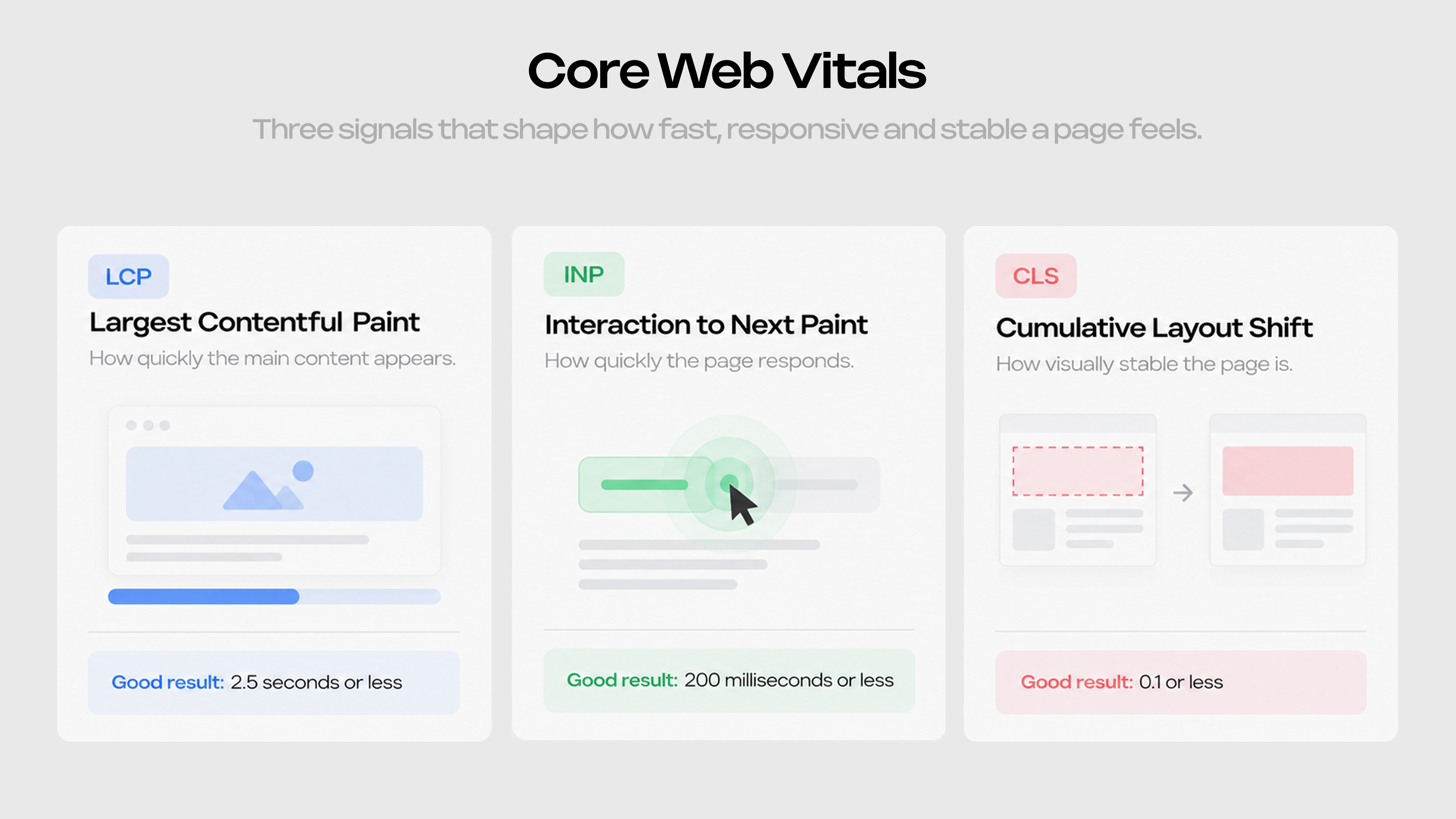
These metrics answer simple questions: Can I see what I came for? Did the website respond? Did the page stay still while I used it?
Heavy images, unnecessary scripts and blocking animation can make the experience contradict the positioning. A company that presents itself as efficient should not make people wait for the interface.
Error states show how thoughtful a company is
Imagine completing an enquiry form and receiving: “Something went wrong.” The message explains nothing, offers no next step and may erase the answers.
A more useful response would say: “We could not send your request, but your answers are saved. Please try again or email hello@company.com.” The failure remains, but the visitor can recover from it.
Nielsen Norman Group’s usability guidance recommends preventing avoidable errors, identifying problems in plain language and suggesting a solution. In practice, that means preserving form input, explaining validation requirements and giving clear feedback while something loads.
These small decisions communicate the brand directly. An approachable company should be helpful when an interaction fails. An efficient one should not make people repeat work.
Motion needs a reason
Motion can give a website character and make changes easier to follow. A button response confirms a click. A transition preserves context. A timed reveal can direct attention to the next piece of information.
When every headline, image and paragraph moves, that hierarchy disappears. The visitor has to filter the interface before reading the message.
Our rule is simple: keep movement that feels like a natural response from the interface. Cut movement that exists mainly to show that animation was possible.
Purposeful motion also respects user preferences. The W3C’s guidance on animation triggered by interaction recommends providing reduced-motion alternatives because unnecessary movement can cause physical discomfort for some users.
The strongest motion supports the brand without becoming the subject of the page.
Accessibility is part of the brand experience
Accessibility is built through practical decisions: keyboard navigation, visible focus states, sufficient colour contrast, meaningful labels, readable typography, captions and alternatives to motion.
These choices determine who can use the website and how much effort it requires. Websites can remove barriers when they are properly designed and coded, or create them when they are not.
This matters for positioning. A company cannot credibly describe itself as clear, inclusive or human-centred if parts of its website are difficult or impossible to use.
Accessibility does not make design less distinctive. It improves the hierarchy, language, feedback and control that support the experience for everyone.
Keep the brand consistent after launch
Websites often lose consistency as teams add new pages without a clear system. Buttons change, spacing drifts and content is forced into layouts that were never designed for it.
A design system defines the reusable visual and interaction rules. A well-structured CMS gives editors the right fields and page types, so they can publish new work without redesigning each page or relying on memory.
The system should create useful boundaries, not identical layouts. Teams still need flexibility, but the core decisions about type, spacing, buttons, content hierarchy and responsive behaviour should remain consistent.
This is what allows the tenth page to feel as considered as the first.
The website keeps changing after launch
A website rarely stays in the condition in which it launched. New scripts affect performance, images become heavier, links break and old content stops answering current customer questions.
Maintenance should therefore include the experience, not only software updates. Test important forms, monitor real-world performance and review what prospects misunderstand or ask the sales team to explain repeatedly.
Useful signals include:
- Core Web Vitals on important pages
- Failed or abandoned forms
- Paths that lead to a meaningful enquiry, sale or sign-up
- Recurring questions after someone visits the website
- Points of confusion found through short usability tests
Analytics show where people stop. Speaking to users helps explain why. Both are more useful when they lead to a specific improvement rather than a larger dashboard.
The brand is in the behaviour
Visual identity creates recognition and sets an expectation. Development carries that expectation through the first load, the first click, a form, an error and every return visit.
When a website looks right but feels wrong to use, another layer of visual polish is rarely the answer. The interface needs to behave with the same care as the identity was designed.
If your website no longer represents the quality of the company behind it, talk to Clustr Studio. We design and build the identity, interface and technical system as one connected experience.